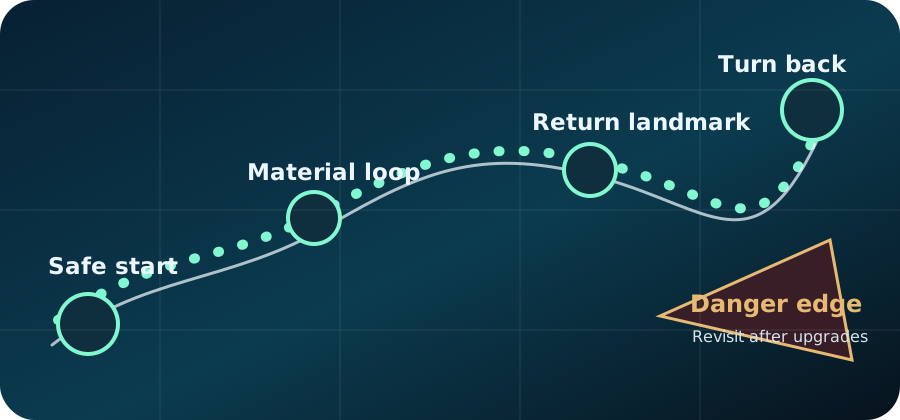
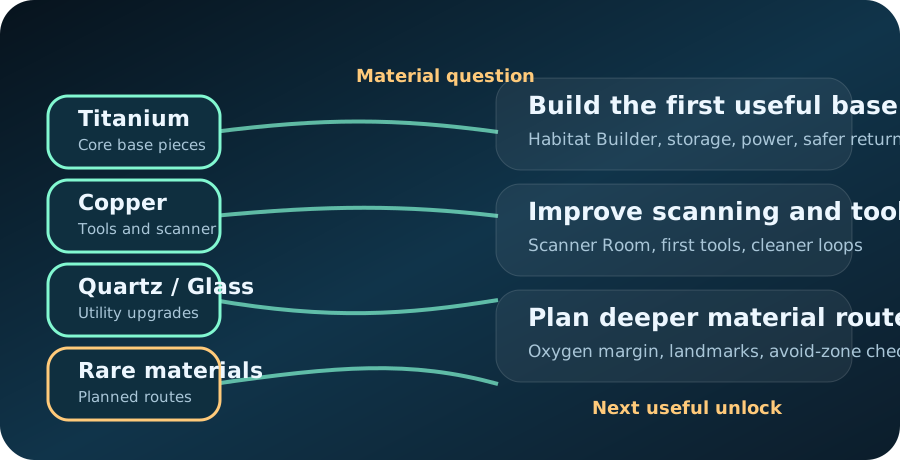
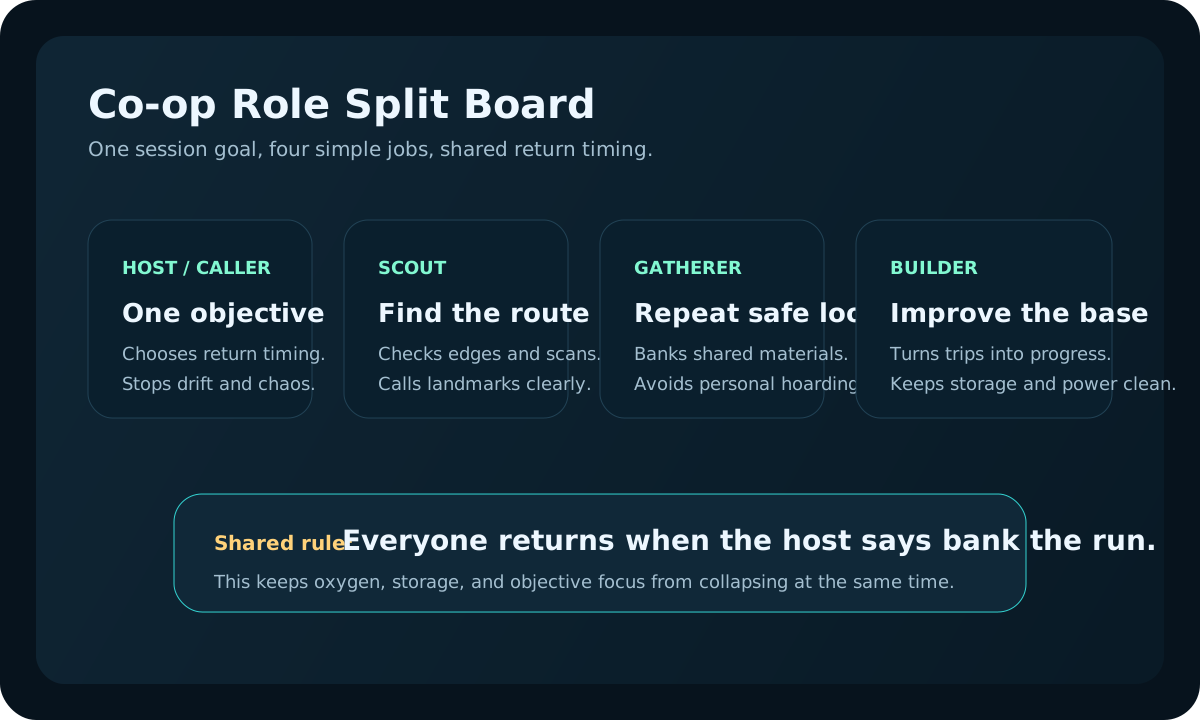
Release-date question?
Use the Early Access status page first when the search is really about launch timing, current availability, or search wording.
Newsroom and patch tracker
Use this page like a newsroom desk: check official sources first, then see which routes, resources, creatures, co-op pages, or base systems may need a fresh guide review.
Open this page for official posts, patch triage, and visible site maintenance. If the question is whether Subnautica 2 is out, when it launched, or how a search phrase should be interpreted, use Early Access status first.



Column boundary
This page should not act like a generic news archive. It exists to connect official posts, patch-sensitive guide clusters, reader reports, and visible site maintenance so returning players know whether old advice still applies.
| Freshness question | Open first | Then do this |
|---|---|---|
| What did the developer actually say? | Official news log | Compare wording before changing a guide. |
| Which advice might be stale? | Patch triage | Check routes, resources, co-op, base, or vehicle pages by risk. |
| What changed on this site? | Maintenance log | Confirm whether the page was actually rewritten or just routed. |
| Where should a correction go? | Reader Reports | Send one page, one changed detail, and one proof note. |
Newsroom Desk
This tracker separates official posts, patch triage, site maintenance, database lookup, and community reports so a returning player can quickly tell what kind of freshness check they actually need before following older advice.
| Reader need | Open first | Use it for | Next handoff |
|---|---|---|---|
| What did the developer announce? | Official news log | Official posts, named updates, hotfixes, and release context. | Patch triage |
| Can I still trust this guide? | Patch triage | Routes, resources, co-op, base systems, and unclear returning-player checks. | Next review queue |
| What changed on this website? | Site maintenance log | Visible edits, structure changes, media cleanup, and trust improvements. | Community reports |
| I need a topic lookup, not news. | Database | Resources, blueprints, map routes, bases, vehicles, co-op, and Early Access lookup. | Guide Library |
Maintenance proof
September 22, 2026: the current pass focused on visible trust and experience signals rather than new page volume. The trust pages now explain how bylines, corrections, media reuse, and route reports are reviewed. Several high-use guides also received field notes that explain how the advice should be used during an actual session.
| Reviewed area | What changed | Why it helps readers |
|---|---|---|
| Trust pages | Added clearer standards for author identity, corrections, media reuse, and report handling. | Readers can see how the site is maintained and who is accountable for updates. |
| High-use guides | Added field notes to beginner, material, base, danger, food, and co-op route pages. | Pages show practical route judgment instead of static summaries. |
| Content audit | Kept the internal manual review queue at zero pages after the duplicate/low-value cleanup. | Future pages should preserve unique answers rather than create thin overlap. |
Use the Early Access status page first when the search is really about launch timing, current availability, or search wording.
Automatic article publishing is paused while route, resource, co-op, and archive pages are checked for overlap, unsupported claims, and independent player value.
Start here when you need official update videos, release context, or which guide pages may need another look after new information.
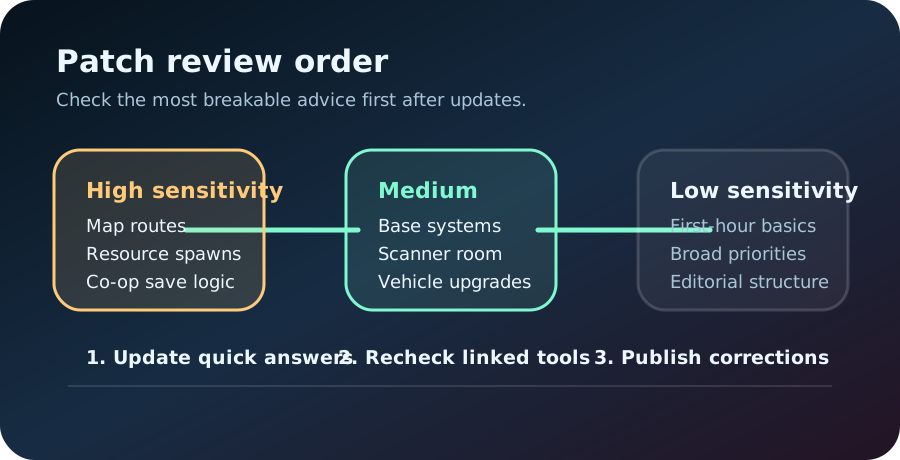
Map routes, dangerous zones, resource locations, creature behavior, and co-op save logic should be checked first after major updates.
Base layout, scanner efficiency, storage, vehicle upgrades, and power advice may shift after balance or systems changes.
General first-hour priorities, editorial structure, and broad route-planning principles usually need lighter review.
Use the contact page for outdated routes, wrong unlock steps, missing co-op details, or better material loops.
Route confidence, material loops, co-op behavior, and any page that is likely to age fastest after a patch.
Official status, practical guide refresh notes, and a quick way to know whether older advice still feels safe.
Start with the official post, then move into one guide lane only after the player question becomes concrete.
Official News
Start with the official source, note which systems changed, and then open the affected guide cluster instead of rechecking the entire site at random.
Recent site changes
Added practical solo/co-op opening decisions, material handoff rules, trade stop conditions, and a source-linked Buddy System check so both guides solve a current player problem instead of repeating general tips.
About, Editorial Policy, Media Policy, Reader Reports, Contact, Disclaimer, Version History, and Updates now explain team identity, original guide judgment, media reuse limits, and reader-report review flow more directly.
The homepage now explains the front-desk model, Guides works as the route desk, categories behave like lane desks, and Updates records the maintenance path readers can verify.
First Hour, Material Priority, First Base Location, Dangerous Zones, First Rare Material Loadout, Rare Material Route, Rare Route Worth It, and Deep Run Worth It gained page-specific field tables, stop rules, and next-step handoffs instead of shared template advice.
Beginner, Materials, Base Building, Vehicles, Creatures, Co-op, Database, Tools, and Updates now explain what each column solves, when to leave the column, and which exact page should be opened first.
First Hour, Material Priority, First Base Location, Dangerous Zones, Map, Resources, Database, Tools, and Updates gained more player-scenario tables and next-step handoffs.
Aligned guide review chips, trust pills, and modified dates across key route, base, material, and co-op pages, while replacing the old Pages breadcrumb on category lanes with a simpler Guides Hub path.
The News Tracker now focuses on official posts, patch-sensitive guide review, and maintenance notes, while release-date and search-intent questions are handed to the Early Access page.
Added a front-of-page router for official news, patch triage, site maintenance, database lookup, and community reports so returning players can choose the right freshness path first.
Created dedicated Database and Community pages so broad wiki-style lookups, corrections, contribution rules, route proof, and public review priorities no longer feel scattered.
Checked the site structure, canonical URLs, external links, required policy pages, local assets, and same-page media behavior so the site stayed stable for readers.
High-use beginner, resource, route, base, scanner, vehicle, and co-op pages now use more specific visuals instead of repeating the same card art.
The homepage update section now mixes maintenance notes with guide updates so returning readers can see what changed recently and why it matters.
The privacy page now explains Google advertising cookies, personalization, browser control, and normal guide access in plainer language.
Official videos and the external map link now come with clearer source notes so readers know what is reference material and what is part of the site itself.
Material, base, scanner, vehicle, and co-op pages now use more topic-specific imagery so one page does not feel copied from another.
The editorial policy page, correction links, and review notes now appear in more footers so readers can see how the site is maintained.
The homepage now highlights policy, correction links, and clearer crafting entry points so the site feels current instead of frozen.
New pages now cover beginner mistakes, safe resource loops, patch checks, co-op base roles, and deeper upgrade readiness.
Two more guides now help with second-session planning and messy first-base recovery.
Added dedicated proof visuals and post-run adjustment tables for landmark navigation, Titanium funding, Copper conversion, and clean-water refill loops.
Added dedicated diagrams for vehicle module proof laps, first-base site return tests, Habitat Builder handoff, and co-op progress handoff so readers can verify advice after one real session.
Added dedicated visuals and after-action checks for first rare material loadouts, base-or-vehicle spending, build-now timing, and whether a successful route should be banked or branched.
Food Sources, Quartz and Glass, Base Power, and Scanner Upgrades gained dedicated field-card visuals plus after-route audits that tell readers whether the page's advice actually helped the next run.
Added a rare material field plan plus a compact base traffic map so readers can judge whether a route or layout is actually saving time before repeating it.
First Tools, Creature Threats, Dangerous Zones, and After First Base now include dedicated diagrams plus tables for next-route choices, retry rules, turnback thresholds, and the first 20 minutes after base placement.
Added custom first-hour, first-base, and co-op session boards so important pages rely less on shared screenshots and more on clear player steps.
Added a dedicated landing page for release-status, official-news, Subnautica wiki, Subnautica 2.0, Early Access, and subnatica searches.
Guide status chips, trust pills, and article modified dates now match so returning players do not see mixed freshness signals.
Added first-hour, material, depth, first-base, and co-op entry cards so readers can leave the homepage through one useful answer.
Each guide now explains why it was tightened, what changed, and what kind of patch should make readers re-check it.
Category cards and high-traffic guide pages now use more distinct visuals so one page does not feel like repeated placeholder content.
Content maintenance queue
The queue makes the site feel actively maintained: first review the pages that affect live player decisions, then update slower support pages after the risky routes and team guidance are stable.
The first audit assigned every public HTML page one clear disposition: 69 core answer or hub pages, 20 supporting entry pages, 10 trust or utility pages, and 1 fallback page excluded from search. The next work is to deepen the 42-page manual review queue before publishing anything new.
Pages are not kept or expanded because they add to the page count. They stay only when they solve a distinct player problem, route readers to the narrowest useful answer, or provide a clear trust and correction function.
| Queue | Pages | Why they come first | Review action |
|---|---|---|---|
| Architecture pass | Homepage, Guides Hub, Category lanes, Updates | These pages explain how the site is organized and make it feel maintained instead of randomly assembled. | Check room roles, starter links, support handoffs, and recent maintenance notes. |
| This week | Co-op Center, First Hour, Material Priority | They decide whether new, returning, and team players reach the right path quickly. | Check quick answers, links, tables, and reader handoffs. |
| Next review | First Base Location, Dangerous Zones | Base and danger guidance can mislead players if route or balance assumptions drift. | Recheck decision tables, safety rules, visuals, and patch sensitivity. |
| After patch notes | Map, Resources, Vehicles | Routes, material value, and upgrades are the highest-risk gameplay clusters after updates. | Compare official notes with current guide recommendations before promoting older advice. |
Review depth
The update page should show ongoing maintenance, not just dates. Use this checklist to explain what changes when a high-impact page is genuinely rewritten, merged, verified, or corrected.
| Review item | Required improvement | Why it matters for players | Where it should link |
|---|---|---|---|
| Quick answer | Confirm the first paragraph still answers the current player problem. | Readers can act before reading a long page. | First Hour |
| Decision table | Update at least one scenario, stop rule, or next-step row. | The page feels maintained instead of recycled. | Material Priority |
| Route or safety proof | Recheck whether route, danger, or base assumptions still match current play. | Old advice is less likely to send players into bad routes. | Map & Route Hub |
| Trust note | Update review date, patch sensitivity, and reader-report path when the page changes. | The site shows editorial maintenance rather than one-time publishing. | Editorial Policy |
Next review queue
These pages stay near the front because they affect route safety, rare-material value, or co-op clarity faster than broader evergreen pages.
Route trust changes fast when map feel, visibility, or creature pressure shifts after a patch.
Likely next review Open danger pageRare-route advice is worth revisiting when one material run can change whether the page still saves time.
Likely next review Open rare routeCo-op pages stay near the top of the list when host logic, save behavior, or shared progress rules are the main reader question.
Likely next review Open Co-op CenterPlayer-first patch triage
Most players do not need a full check first. They need to know which part of their active run is now risky, stale, or worth retesting before they keep following old advice.
Start with routes and landmarks, then recheck materials and recipes, then co-op and system timing, then anything that still feels unclear.
How pages get checked
Players need to know whether a page is still safe to follow or should be rechecked after a patch. This section explains the source order, timing, and correction path behind the guides.
Official posts, trailers, dev vlogs, and patch notes are treated as the strongest source for names, release timing, and changed systems.
Routes, base priorities, material loops, and co-op splits are written as field guidance, then marked by update sensitivity.
Map, biome, creature, resource, and multiplayer pages receive higher-risk labels because they can change quickly during early access.
Reader reports are routed through the correction form with guide URL, platform, version context, and what changed in the run.
Player check
Use this quick check before following advice from an older page. Players usually do not need perfect certainty. They need to know whether the guide is still safe enough to follow now.
| If the guide is about | Trust it more when | Be careful when | Check this next |
|---|---|---|---|
| First-hour priorities or broad survival order | No patch changed the core opening systems. | Official notes mention early pacing, crafting, or oxygen changes. | First hour guide |
| Routes, biomes, danger zones, or landmarks | Recent official source links and guide visuals still match the route feel and warning signs. | Map layout, creature behavior, or route landmarks changed in patch notes. | Map & Route Hub |
| Resources, farming loops, or rare material paths | Material locations and recipe needs still match the latest notes. | Resource placement, scan targets, or unlock costs were adjusted. | Resources & Materials |
| Co-op hosting, saves, or shared progress | No multiplayer changes touched saves, ownership, or session flow. | Any co-op patch landed after the page was last reviewed. | Co-op Center |
| Base power, Scanner Room, storage, vehicles, or upgrade timing | System costs and balance still feel consistent with the guide. | Patch notes mention power, upgrades, scanning, vehicle balance, or progression speed. | Vehicles & Bases |
Use this priority diagram after any update: review the pages most likely to break first, then move down to broader evergreen guidance.
Real patch warning signs
Update pages feel more honest when they show the kinds of moments where older advice can break. Readers should be able to see why one section needs review before another.

If return anchors, safe edges, or danger spacing feel different, route pages should be checked first.
Open route check pages
A small balance shift can ripple through storage, builder timing, scanner value, and vehicle order faster than evergreen beginner advice.
Open resource checks
Multiplayer pages should be treated as high-risk whenever an update touches ownership, progression, or role flow.
Open Co-op CenterVisual freshness checks
After a patch, map routes, material loops, and co-op assumptions are the visuals most likely to need a second look. Use this shortcut row before updating the broader guides.
When a guide feels stale, compare it with the latest official trailer or vlog before rewriting the page. These are the fastest visual reference points.
External media note: these links go to official publisher posts in a new tab. They are source references for review work, not embedded ads, sponsored recommendations, or replacement content for the written guides.
Use presets when you already know the patch type. The tracker will narrow to the highest-risk cluster first so players and editors do not have to guess where to re-check next.
High sensitivity. Safe biomes, early route loops, landmarks, and dangerous zones.
Re-check this cluster when landmarks, creature pressure, or route memory feel different.
Use this when you need one visible next page before the live filter panel loads.Showing all patch-sensitive clusters.