Power guides are important because they turn a player's first base
from a short-term shelter into a reliable progression tool.
BasesMid-funnel system topicSupports scanner and vehicle rooms
Last reviewed August 17, 2026Patch sensitivity Medium
Power advice is rechecked when base utility costs, scanner demand,
or early room priorities shift in a patch.
Quick answer
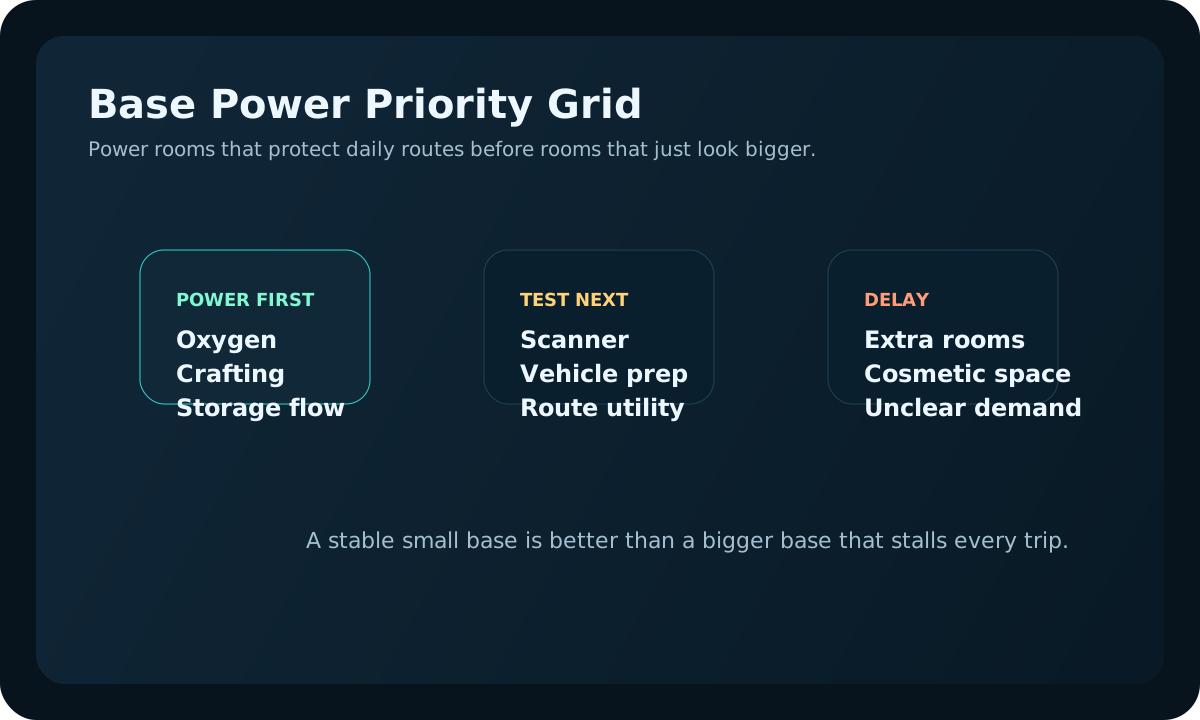
Base power works best when essentials get priority first:
oxygen recovery, crafting, storage flow, and then utility
rooms like scanning or vehicle support. If extra rooms make
those basics unreliable, the base is underpowered no matter
how complete the layout looks.
Page media
Use these support pages before you trust a power expansion.
Power advice is easiest to follow when scanner value, storage,
and room order are tied to one clear base job.
Use the screenshots as a quick sanity check: power is doing its
job when the base shortens normal routes instead of becoming
another system that needs rescue.
Power the daily loop first.
Crafting, storage, and oxygen recovery should feel reliable before optional rooms compete for power.
Add utility only after the base is calm.
Scanner and vehicle support should prove the base is stronger, not expose that the essentials are underpowered.
Early power priority
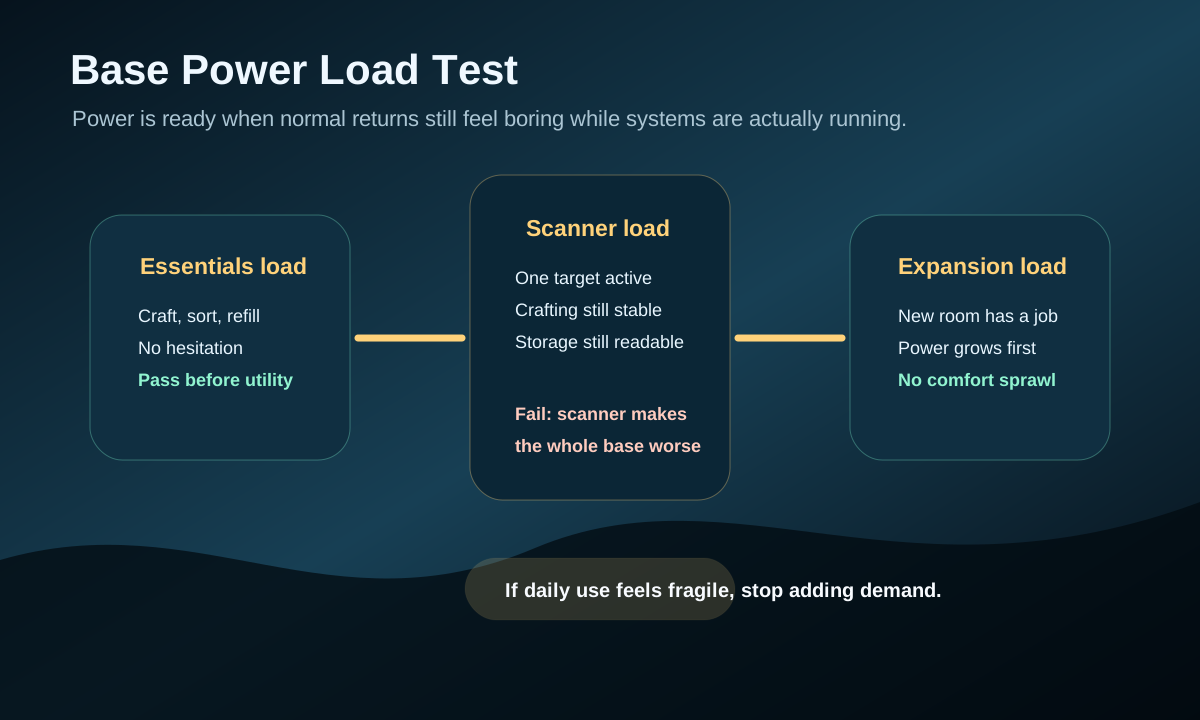
Run the base under normal use before expanding: if crafting, storage, or scanning makes power feel fragile, stop adding demand.Use power to protect daily base function first. Expansion should come after the base already helps real routes.
Power the essentials first: oxygen recovery, crafting access,
and storage flow. A small reliable base is better than a large
base that keeps stalling.
Add power before adding rooms that create new demand. If the
base is already struggling, expansion will make every trip
feel slower.
Treat Scanner Room and vehicle support as the next power test.
If those systems are unstable, pause decorative building.
Upgrade power only when the current setup blocks a real route,
not because the base layout looks incomplete.
Power warning signs
Crafting or scanning feels unreliable during normal trips.
You avoid using base systems because you are worried about drain.
New rooms are being added before storage and crafting flow is stable.
The base location is poor, but you keep investing power to compensate.
Build power for these first
Crafting and storage flow before optional rooms.
Scanner use only after the base can support repeated scans.
Vehicle or expansion support only when routes justify the extra demand.
Before adding more rooms
Check whether existing systems run reliably.
Fix power gaps before adding scanner, vehicle, or decorative space.
Expand only when the next room solves a real route or storage problem.
If the base keeps stalling
Stop adding rooms and identify which system is failing first: crafting, storage flow, scanner use, or support utilities.
Cut the plan back to the rooms that actually support daily routes.
Stabilize power for those rooms before rebuilding toward scanner or vehicle support again.
If the same problem keeps returning, reevaluate the base location instead of endlessly compensating.
Use this first power stability test
A stable power setup should survive ordinary play, not just
look fine while the base is idle.
Test step
Do this
Stop when
Good result
Normal route return
Come home, craft, sort, and refill without shutting down useful rooms.
The base only feels stable when nothing is being used.
Daily loops still feel smooth under normal load.
Utility test
Use one heavier system like scanning only after basics are already behaving well.
One extra utility room makes the whole base feel unreliable.
You can clearly tell which added system power is meant to support.
Expansion check
Add new demand only after current rooms already feel boring and dependable.
You are using more power only to make an unstable layout bigger.
Each added room still leaves storage, crafting, and oxygen reset calm.
Return-load check before adding another powered room
The easiest way to judge early base power is to test it during a
normal return, not during a quiet moment. If one ordinary route
already strains the base, another powered room usually makes the
real problem harder to see.
Return moment
Healthy sign
Do this before expanding
Unload and craft
The base stays stable while storage and crafting are both active.
Fix power for the rooms already doing daily work.
Restock and leave again
One short prep loop does not make the base feel fragile.
Trim support demand until the same loop feels boring.
Scanner or utility use
Extra systems clearly improve one route without destabilizing the hub.
Pause utility growth if support rooms create more babysitting than value.
Co-op or repeated visits
The base survives normal shared use without power becoming the main conversation.
Shrink the footprint before adding more powered convenience.
When to expand power again
The current base already supports normal crafting and storage without hesitation.
The next room solves a real route problem such as scan coverage or vehicle prep.
You are not adding more demand just to make the base feel larger.
What power problems usually mean upstream
The base was expanded before its location, storage flow, or daily route value were really settled.
Scanner and utility demand were added before the base had one strong repeated job.
Players are compensating for weak route planning by forcing more machines into the same unstable hub.
The power issue is really a "base too early" or "base in the wrong place" issue wearing a different label.
First power stability plan
Stage
Build or check
Stop rule
Minimum base
Power only the machines that support storage, crafting, and one repeatable route.
Do not add rooms while basic machines still stall.
Scanner support
Add power only if scanning turns the next route into a clearer target.
Pause if scanning drains the base faster than it improves route quality.
Expansion
Expand power before adding comfort rooms, extra machines, or vehicle support.
Stop building when power, storage, or materials become the new bottleneck.
One-session power audit
Test power while the base is doing real work, not while it is
idle. A stable setup should support one return, one craft, one
restock, and one utility check without making the player babysit
the power system.
Live test
Pass signal
Fail signal
Fix first
Unload and craft after a normal route
Crafting feels automatic after drop-off.
You delay crafting because power is uncertain.
Essential power before new rooms.
Run one scanner or utility task
The task helps without disrupting storage and crafting.
One utility system makes the whole base unreliable.
Power support or a smaller utility plan.
Prepare for the next route
Food, water, storage, and tools reset calmly.
Power worry changes what you choose to bring.
Base basics before deeper route prep.
Add a room or system
The added demand solves a named route problem.
The addition only makes the base look bigger.
Route goal and power capacity.
August 17 update: diagnose power trouble by the moment it appears.
Power problems are easier to fix when you name the moment they
interrupt play. Do not add more generation blindly; first decide
whether the base is failing during crafting, scanning, return
prep, or expansion.
Power trouble appears when
Likely cause
Fix before expanding
Next guide
You return with materials and crafting feels unreliable.
The core base loop is underpowered, not just underbuilt.
Prioritize essential crafting and storage support before utility rooms.
Power is not just a number attached to the base. It is a promise
that the base can still do its job after a normal trip: recover
oxygen, process materials, support storage decisions, and run
the utility room that actually saves time. If one new room makes
every return feel fragile, the base grew faster than its support
layer.
Before expanding, test the base with a realistic loop: leave,
collect one useful batch, return, craft or store it, then check
whether power anxiety changed your next decision. If the answer
is yes, fix power before adding more rooms. A smaller reliable
base usually beats a larger base that makes every route begin
with maintenance stress.
Power is stable when the base can finish its job without babysitting.
Do not add power because the number looks low; add it because a
scanner, craft chain, or recovery point is failing. If the base only
needs a small storage role, a simpler setup may be better than an
oversized power plan.
Add power
When the current system cannot stay online during normal use.
Reduce load
When extra rooms are creating demand without solving a blocker.
Move on
When power is no longer the reason routes or crafting stall.